
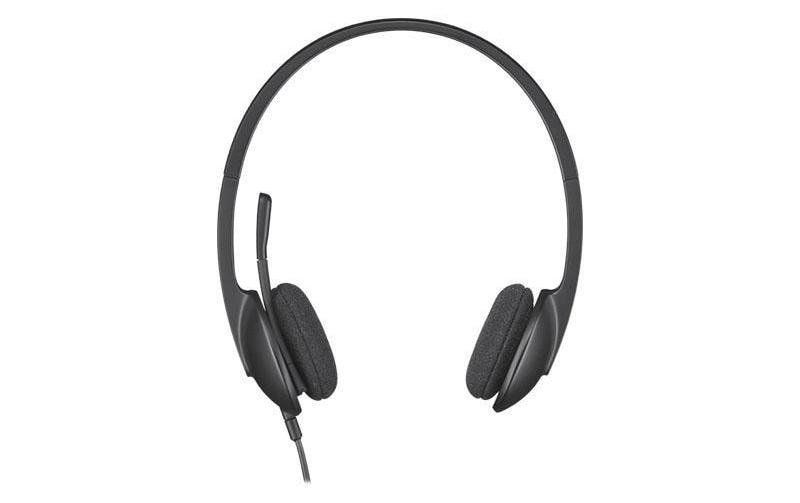
Logitech H340 USB-Headset stereo Mikrofon, USB
Art.-Nr. 217335 · Herst.-Nr. 981-000475 · EAN 5099206038844
17.12 CHF 24.08 CHF Inkl. MwSt.
inkl. 8.1 % MwSt. (CHF 1.28) · Versand CHF 8.90, gratis ab CHF 500 exkl. MwSt.
Verfügbar, Lieferung in 1 bis 3 Werktagen
- Versand CHF 8.90, gratis ab CHF 500 exkl. MwSt.
- 24 Monate Garantie
- 7 Tage Rückgabe
Zahlungsarten: TwintVisaMastercardPostFinancePayPalVorauszahlung
📈 Preisentwicklung▼ 2.3% günstiger als vor 30 TagenDetails ▾
Elevate la vostra esperienza audio con il Logitech H340 USB-Headset
Il Logitech H340 USB-Headset stereo Mikrofon è un’ottima scelta per chi cerca di elevare la qualità della propria esperienza audio in campo AV-Tech. Questo headset, prodotto dalla famosa azienda Logitech, offre una combinazione perfetta tra comfort e tecnologia, rendendolo adatto a diverse applicazioni.
Caratteristiche tecniche ed specifiche
- Categorie: Headsets, Telco & UCC
- Einsatzbereich: Headset, Kabelgebunden: Ja, Trageart: On-Ear (Ohraufliegend), Überkopfbügel, Trageweise: Duo / Stereo (Zwei Lautsprecher)
- Anschlussart: USB-A
Vantaggi per gli AV-Techniker e gli Integratori
Il Logitech H340 USB-Headset offre un’elevata qualità audio, grazie ai suoi due altoparlanti stereo, garantendo una comunicazione chiara ed efficace. Inoltre, l’headset è stato progettato per essere confortevole e leggero, rendendolo adatto anche a lunghe ore di utilizzo.
Use-Cases e applicazioni
- Comunicazione professionale: Il Logitech H340 USB-Headset è ideale per le comunicazioni professionali, come videoconferenze, telefoni di ufficio o chiamate VoIP.
- Giochi online e streaming: Grazie alla sua qualità audio stereo, l’headset è anche adatto per giochi online, streaming o musica.
Compatibilità ed integrazione
Il Logitech H340 USB-Headset è compatibile con sistemi operativi come Windows e MacOS. Non riceve tuttavia la certificazione Microsoft.
Un’ottima scelta per gli AV-Techniker
Il Logitech H340 USB-Headset stereo Mikrofon offre una combinazione perfetta tra qualità audio, comfort ed affordabilità. Se sei un AV-Techniker o un integratore e stai cercando di migliorare la tua esperienza audio, il Logitech H340 USB-Headset è certamente una scelta ottima da considerare.
| Allgemeine Daten | |
|---|---|
| Produkt | Logitech H340 USB-Headset stereo Mikrofon, USB |
| Hersteller | Logitech |
| Technische Spezifikationen | |
| Eigenschaft | Wert |
| Kanalanzahl | Stereo |
| USB-Typ | USB |
| Mikrofon-Aufnahme | Digital (USB) |
| Frequenzgang Mikrofon (Höhenbereich) | 20 Hz – 20 kHz |
| Maximale Mikrofon-Ausgabe | 83 dB SPL @1kHz, 3% THD (max.) |
| Headset-Frequenzgang (Höhenbereich) | 20 Hz – 20 kHz |
| Maximale Lautsprecher-Ausgabe | 106 dB SPL @ 1kHz, 3% THD (max.) |
| Anschlüsse & Schnittstellen | |
| USB-Typ | USB 2.0 |
| Kabel-Länge | 1,8 Meter |
| Leistungsdaten | |
| Energieversorgung | USB (5V) |
| Mikrofon-Nachlaufzeit | Wählbare Nachlaufzeiten: 10ms, 20ms, 30ms, 60ms |
| Energieverbrauch | Max. 50mA |
| Physikalische Eigenschaften | |
| Gewicht (ohne Kabel) | 135 g |
| Ausmaße (B × H × T) | Länge: 196mm, Breite: 80mm, Höhe: 24mm |
| Umgebungsbedingungen | |
| Betriebstemperatur | 0°C – 40°C (32°F – 104°F) |
| Nachlassener Haltezeit | 72 h bei 60% RH, 25°C (77°F) |
| Verpackungstemperatur | -40°C – 85°C (-40°F – 185°F) |
| Lieferumfang | |
| Inklusiv in der Verpackung | Headset, 1,8 Meter USB-Kabel |
| Hersteller | Logitech |
|---|---|
| Herstellernummer | 981-000475 |
| EAN | 5099206038844 |
| Gewicht | 0.25 kg |
| Garantie | 24 Monate |
Wann ist die Ware bei mir?
Kann ich auf Rechnung bestellen?
Welche Garantie gilt?
Sind die Preise inklusive MwSt.?
Installation & Setup Tips
1. Plug the headset into a USB port on your computer or laptop. The system should automatically detect and install the necessary drivers. 2. Check the volume level in the audio settings of your device to ensure that the headset is properly configured. 3. If you are using the headset with a conference phone, consult the user manual for specific setup instructions.Häufige Probleme und Lösungen
1. No sound output: Ensure that the headset is securely connected to your device and check the volume level in the audio settings. If the problem persists, try updating or reinstalling the drivers for the headset. 2. Static noise: This issue may be caused by electromagnetic interference. Try moving the headset away from other electronic devices or use a surge protector to minimize interference. 3. Headset not detected: If the system doesn't detect the headset, try restarting your device and reconnecting the headset. If the problem persists, consult the user manual for troubleshooting steps or contact Logitech support.Best Practices
1. Always store the headset in a safe and dry place to prevent damage. 2. Clean the microphone and ear pieces using a soft cloth or brush to remove dust and debris. 3. Use an anti-static wrist strap when handling the headset to avoid damaging the electronics. 4. Avoid exposing the headset to extreme temperatures, direct sunlight, or moisture.Kompatibilitätshinweise
The Logitech H340 USB Headset is compatible with Windows, macOS, Linux, and Android devices. However, some features may not work with all operating systems. For the most up-to-date compatibility information, consult the user manual or visit the Logitech website.Wartung und Service
Regularly clean the headset to maintain optimal performance. If you encounter issues that cannot be resolved through troubleshooting steps, contact Logitech support for assistance.- Falsch bestellt?Melden Sie sich innert 7 Tagen nach Erhalt, und wir tauschen den Artikel um oder schreiben Ihnen den Betrag gut. Voraussetzung: unbenutzt und vollständig originalverpackt. Die Rücksendung geht zu Ihren Kosten. Rückgabe-Richtlinien


