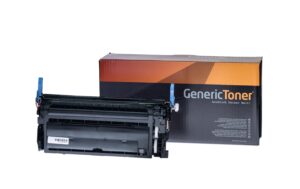
Freecolor Toner HP CF360 Cyan
Nur noch 3 Stück an Lager
“Freecolor Cyan Toner for HP CF360 Printer (5000 Pages), Universal Ink Solution – Not Original”
43.60 CHF 59.49 CHF Inkl. MwSt.
Nur noch 3 Stück an Lager
📈 Preisentwicklung▼ 4.9% günstiger als vor 30 TagenDetails ▾
Introducing the Freecolor K15857F7 – A Revolutionary Solution for Your Printing Needs
Welcome to a new era of printing with the Freecolor K15857F7, an exceptional Cyan toner cartridge designed specifically for the HP CF360 Series. This high-capacity solution offers unparalleled performance and cost efficiency, making it the ideal choice for AV-Technicians and Integrators.
Superior Performance and Exceptional Quality
- 5000 pages per cartridge: Experience uninterrupted printing with our high-capacity toner, reducing the need for frequent replacements.
- Cyan Toner/Ink: Deliver vibrant and consistent Cyan prints that meet your professional standards.
Versatile Applications and Use-Cases
From graphic design to office documents, the Freecolor K15857F7 is designed to cater to a wide range of printing needs. Its compatibility with the HP CF360 Series ensures seamless integration into your existing setup.
Advantages for AV-Technicians and Integrators
- Cost-Effective: With a high page yield, the Freecolor K15857F7 helps reduce operational costs and ensures minimal downtime due to toner replacements.
- Reliable Performance: Trust in our commitment to quality and reliability, delivering consistent results every time.
Compatibility and Integration
The Freecolor K15857F7 is specifically designed for the HP CF360 Series. Its compatibility ensures seamless integration into your existing setup, providing you with a reliable and high-performance solution.
Invest in Quality Today
Upgrade your printing experience with the Freecolor K15857F7. With its superior performance, versatile applications, and cost-effectiveness, this is a choice that will not disappoint. Make the smart investment today and elevate your printing capabilities.
| Allgemeine Daten | |
|---|---|
| Produkt | Freecolor, Toner HP CF360 Cyan cyan |
| Hersteller | Freecolor |
| Technische Spezifikationen | |
| Eigenschaft | Wert |
| Output Format | 5000 Seiten |
| Anschlüsse & Schnittstellen | |
| Eigenschaft | Wert |
| Leistungsdaten | |
| Eigenschaft | Wert |
| Physikalische Eigenschaften | |
| Eigenschaft | Wert |
| Umgebungsbedingungen | |
| Eigenschaft | Wert |
| Lieferumfang | |
| Eigenschaft | Wert |
AV-Techniker Tipps & Hinweise für das Produkt: HP Freecolor CF360 Cyan Cyan, 5000 Seiten
Installation & Setup
- Stellen Sie sicher, dass das Gerät vor dem Installationsprozess ausgeschaltet ist.
- Lesen Sie die Anleitung zum Setzen des Toners HP CF360 Cyan cyan genau durch.
- Nach dem Einsetzen schalten Sie das Gerät wieder ein und führen Sie den Startprozess durch.
Häufige Probleme und Lösungen
- Problem: Die Druckerleistung ist verringert. Lösung: Prüfen Sie den Tonerstand und ersetzen Sie, falls er zu niedrig ist.
- Problem: Das Gerät stößt Fehler aus. Lösung: Stellen Sie sicher, dass alle Kabel verbunden sind und die Software aktuell ist.
Best Practices
- Stellen Sie sicher, dass der Tonerstand immer genügend Toner hat.
- Löschen Sie regelmäßig den Druckauswurf, um die Leistung des Geräts zu erhöhen.
- Führen Sie regelmäßige Wartungsarbeiten durch, um das Gerät langfristig effizient zu halten.
Kompatibilitätshinweise
Der HP Freecolor CF360 Cyan cyan Toner ist nur mit Geräten kompatibel, die den gleichen Tonersatz verwenden.
Wartung und Service
- Regelmäßige Wartungsarbeiten sind unabdingbar, um das Gerät zu erhalten und effizient zu halten.
- Stellen Sie sicher, dass Sie die Software regelmäßig aktualisieren, um Fehler zu vermeiden und die Leistung des Geräts zu erhöhen.
- Kontaktieren Sie den Service, falls Sie mit dem Gerät Probleme haben, die Sie nicht lösen können.